 Kimi K3
Kimi K3 pdfcraft — Read and organize pdf documents
Open Kimi K3 pdfcraft directly in your browser. Bring an existing file, make your changes, and sign in when you are ready to save or export a private copy.
Office workspace
简介
Kimi K3 pdfcraft: Read a PDF in your browser
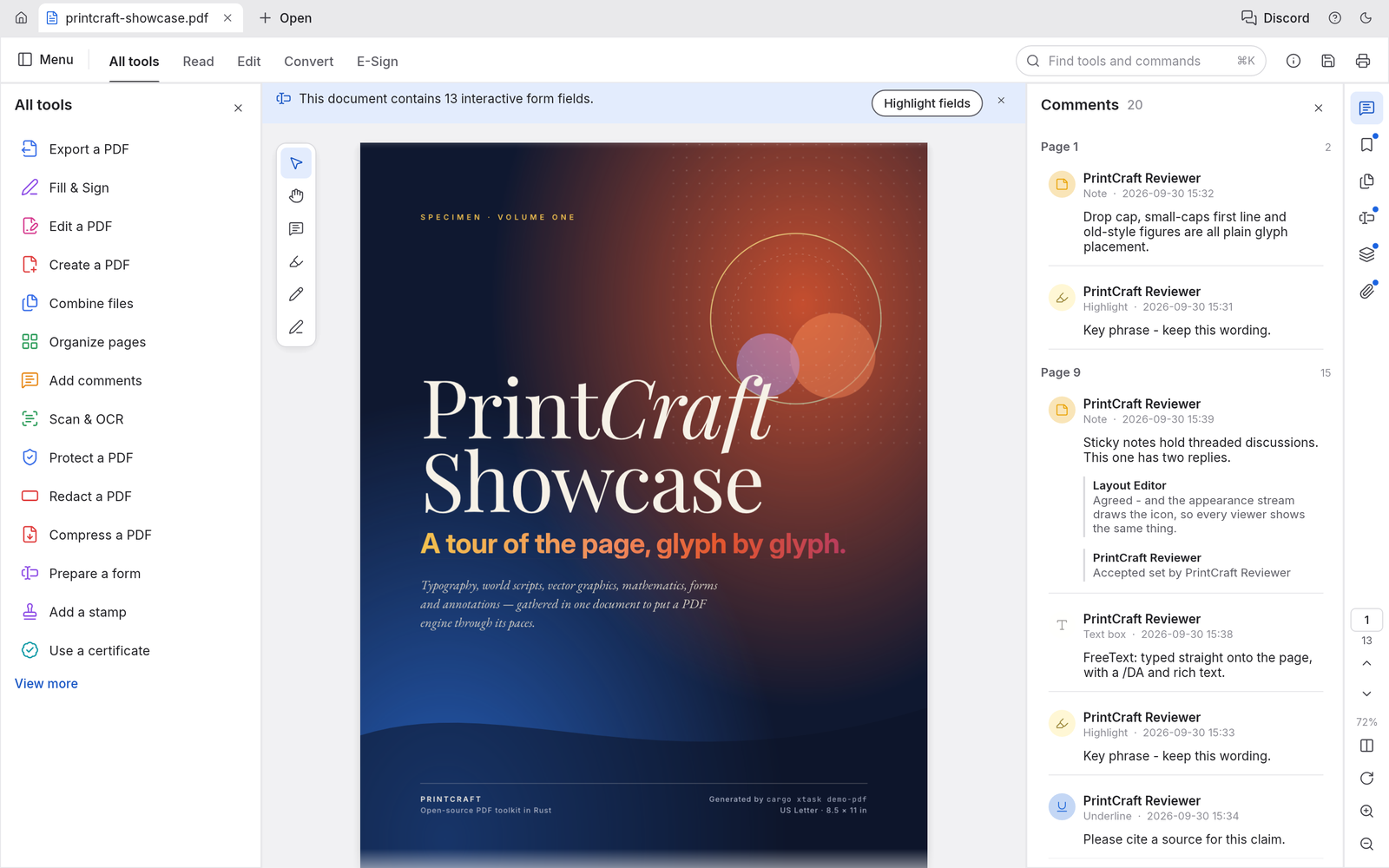
Use Kimi K3 pdfcraft to read and organize PDF documents with a focused, editable workflow. A PDF workbench with page rendering, search, bookmarks, page organization, combining, splitting, comments, and supported form filling. Its browser build uses the same Rust engine as the desktop application and already includes a host communication bridge. Keep an untouched source copy while you inspect the result. A short representative file is a useful first check before committing a complex project to a new editor.
Kimi K3 pdfcraft: Open a document
In Kimi K3 pdfcraft, load a PDF and inspect its pages before making changes. The reader provides a focused starting point for everyday document work. Review the surrounding content after each substantial change. The most useful check is whether another person can understand the result without seeing the steps that produced it.
Choose a reading layout
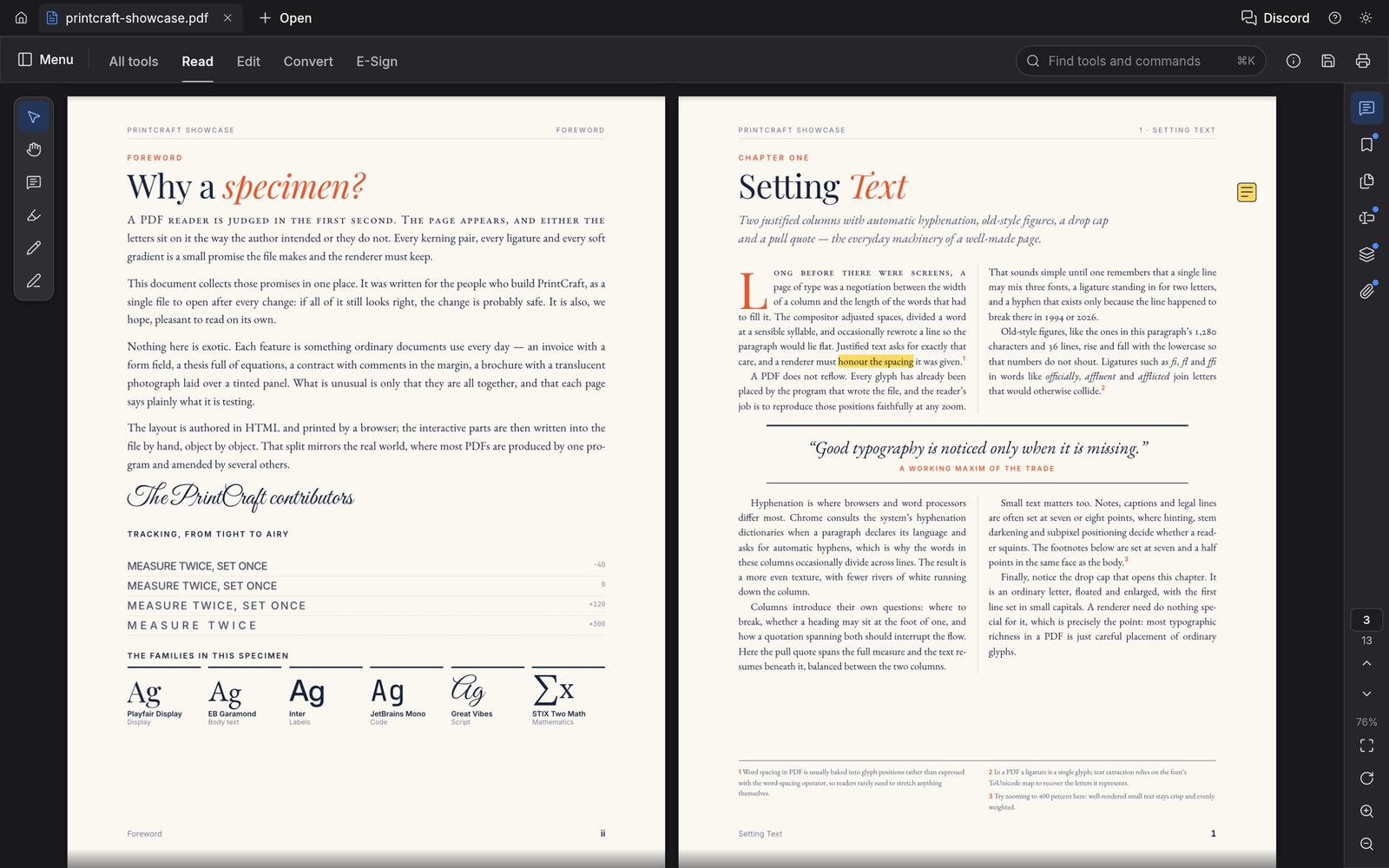
In Kimi K3 pdfcraft, use supported page layouts and zoom controls to inspect text and images. Check small labels before deciding a page is complete. Choose a file name that describes the purpose and version of the work. This makes later review easier when several related copies exist in your private file library.
Navigate longer files
In Kimi K3 pdfcraft, use thumbnails, bookmarks, and page labels to reach the relevant section. Search helps locate a phrase within a long document. Work through one concrete task at a time, then inspect the result in the format your reader will receive. An editable source and a reading copy serve different purposes.
使用方法
How to use Kimi K3 pdfcraft
- STEP 1
Open the workspace
Choose the Kimi K3 pdfcraft workspace and open a supported file using the editor menu. Start with a small representative document.
- STEP 2
Make your changes
Use the editor controls to adjust the content, review nearby sections, and check that the result still matches your intended task.
- STEP 3
Sign in to continue
When you save or export, sign in with your account. Your pending file remains in this browser while you complete authentication.
- STEP 4
Save and inspect
Save a private copy, check the recorded result in your files, and inspect the downloaded output before sharing it with another person.
功能
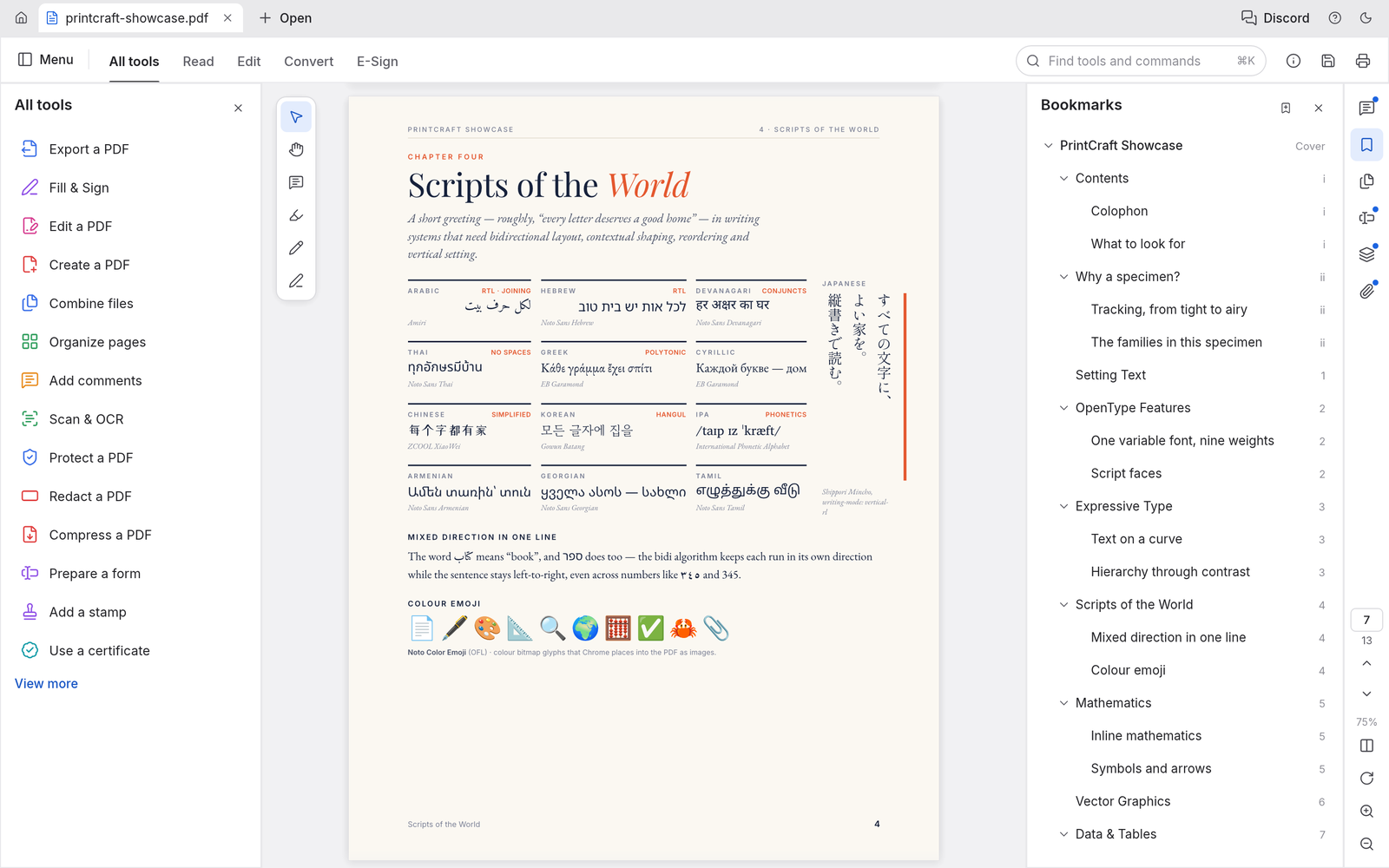
Kimi K3 pdfcraft: Organize pages visually
Use Kimi K3 pdfcraft to read and organize PDF documents with a focused, editable workflow. Review the surrounding content after each substantial change. The most useful check is whether another person can understand the result without seeing the steps that produced it.
Reorder a document
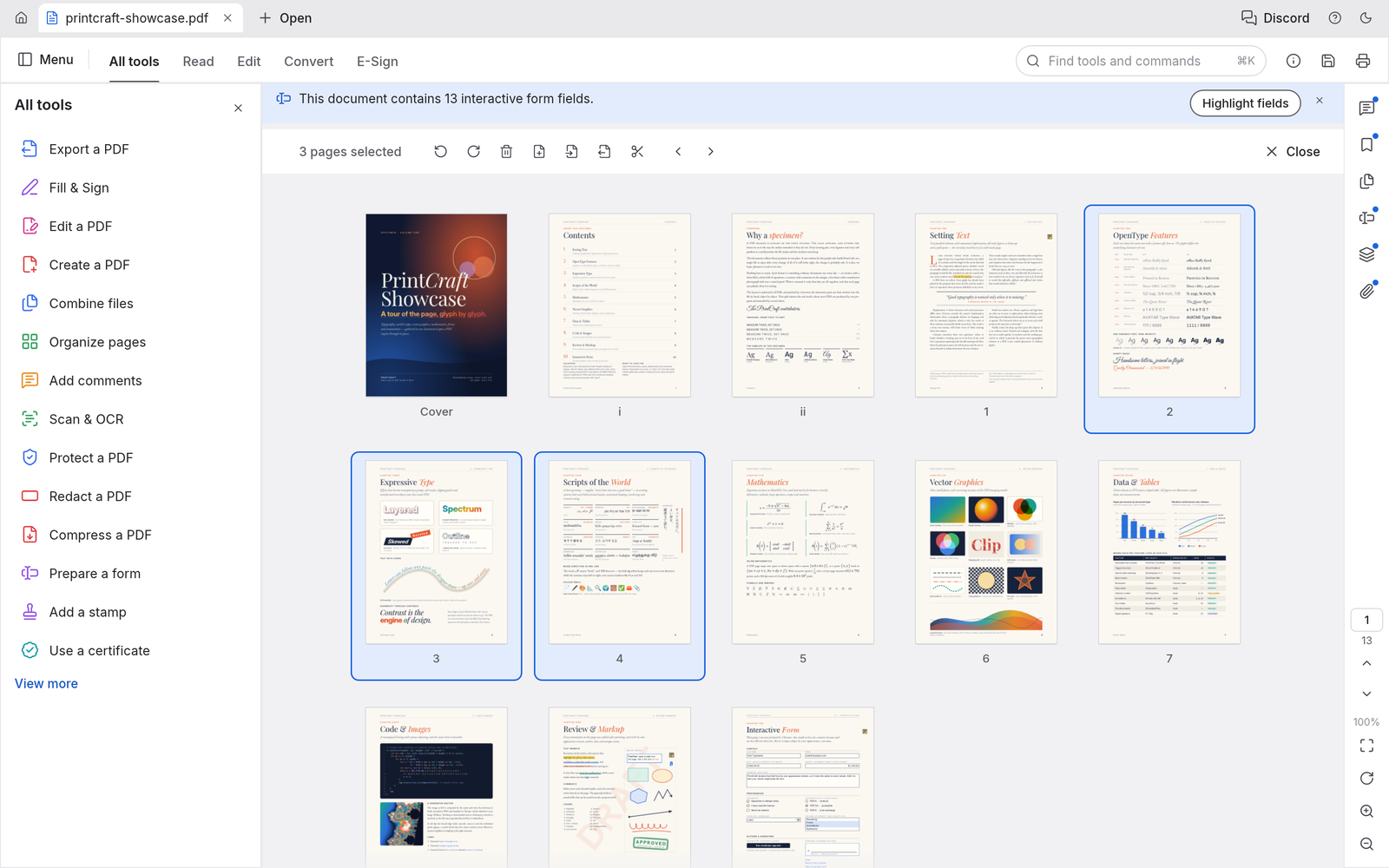
In Kimi K3 pdfcraft, inspect page thumbnails and move pages into a useful sequence. Check references and page numbers after changing the order. Choose a file name that describes the purpose and version of the work. This makes later review easier when several related copies exist in your private file library.
Rotate and remove pages
In Kimi K3 pdfcraft, rotate pages that were scanned sideways and remove pages you no longer need. Review the selection before saving a new copy. Work through one concrete task at a time, then inspect the result in the format your reader will receive. An editable source and a reading copy serve different purposes.
Insert supporting pages
In Kimi K3 pdfcraft, add pages from another file or insert a blank page where needed. Confirm the combined order before sharing. The browser workspace is available before sign-in. Account authentication is required when you want the site to retain a saved result or provide an exported download.
Kimi K3 pdfcraft: Combine, extract, and split
Use Kimi K3 pdfcraft to read and organize PDF documents with a focused, editable workflow. Choose a file name that describes the purpose and version of the work. This makes later review easier when several related copies exist in your private file library.
Combine related files
In Kimi K3 pdfcraft, merge related PDFs into one document. Inspect bookmarks, links, forms, and attachments that matter to your particular files. Work through one concrete task at a time, then inspect the result in the format your reader will receive. An editable source and a reading copy serve different purposes.
Extract selected pages
In Kimi K3 pdfcraft, create a smaller document from selected pages. Check that the result includes the context a reader needs. The browser workspace is available before sign-in. Account authentication is required when you want the site to retain a saved result or provide an exported download.
Split a long document
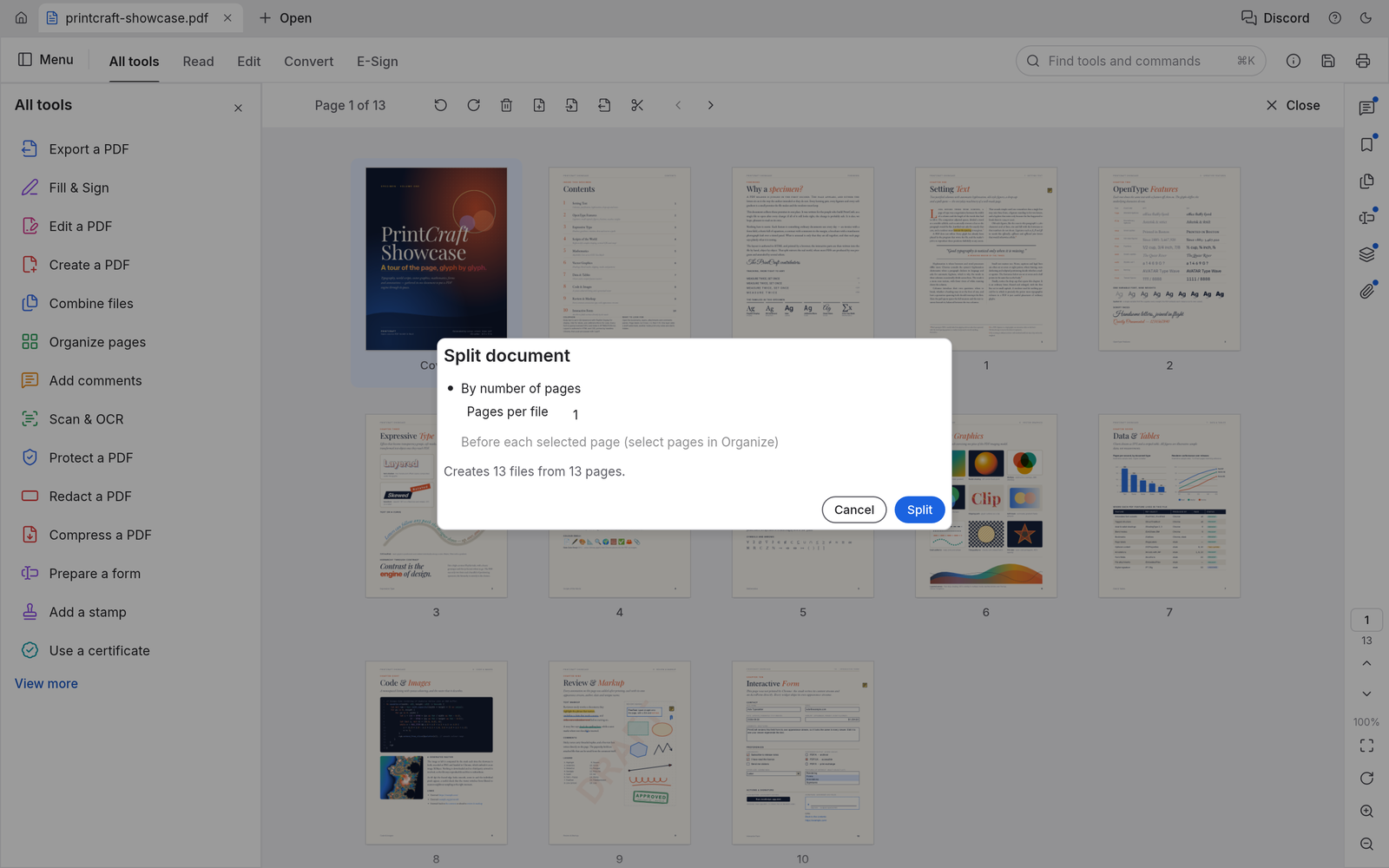
In Kimi K3 pdfcraft, divide a PDF into smaller files using supported splitting tools. Give each output a meaningful name and verify the page ranges. Complex imported files deserve extra attention. Compare layout, text, values, and supported objects with the source before treating an exported copy as the final version.
Kimi K3 pdfcraft: Search, comments, and forms
Use Kimi K3 pdfcraft to read and organize PDF documents with a focused, editable workflow. Work through one concrete task at a time, then inspect the result in the format your reader will receive. An editable source and a reading copy serve different purposes.
Find a passage
In Kimi K3 pdfcraft, search text and inspect matches in their page context. Text extraction depends on how the original PDF stores its content. The browser workspace is available before sign-in. Account authentication is required when you want the site to retain a saved result or provide an exported download.
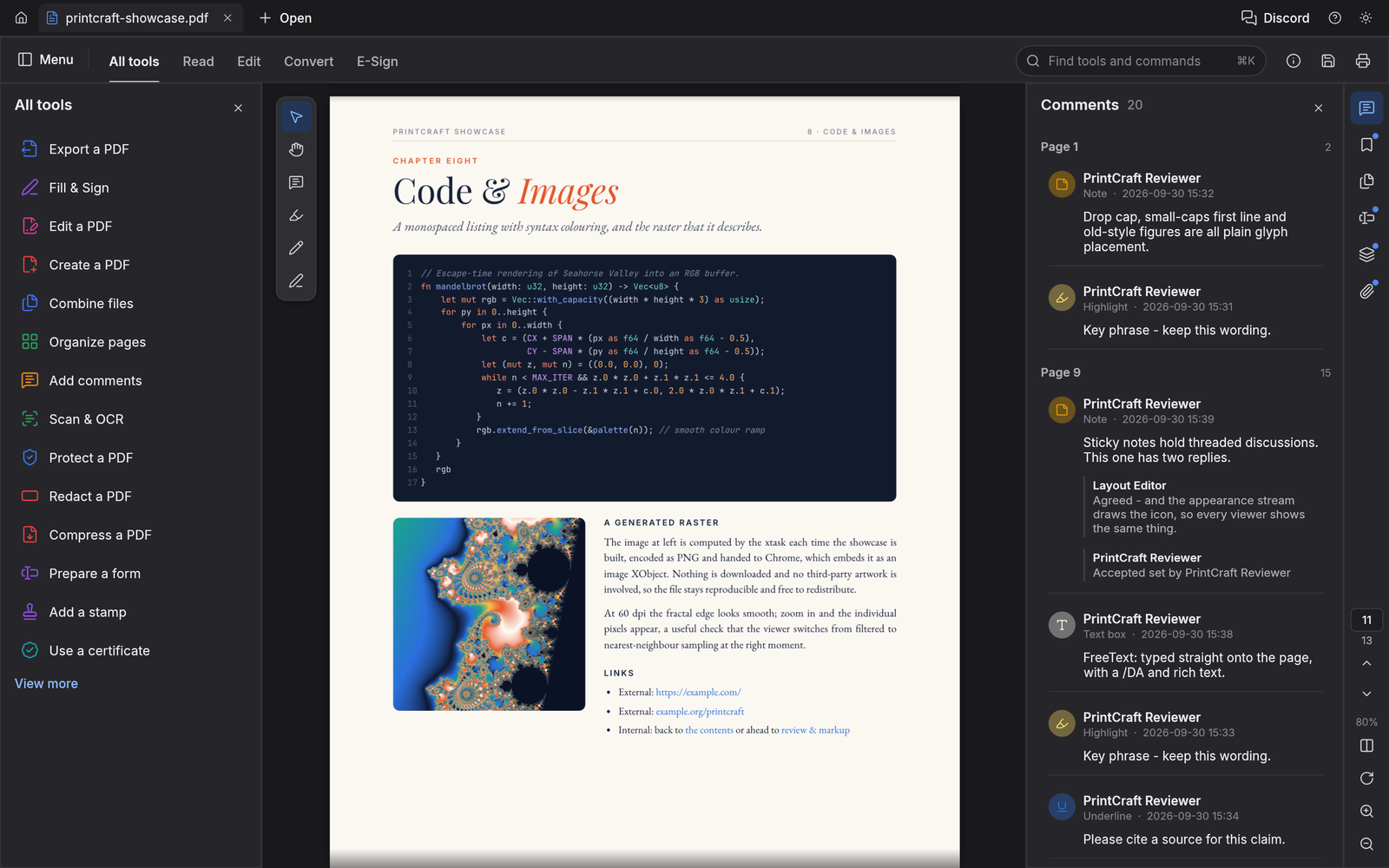
Annotate a review
In Kimi K3 pdfcraft, add supported comments and markup to communicate a change. Keep the annotation connected to the passage or area being discussed.
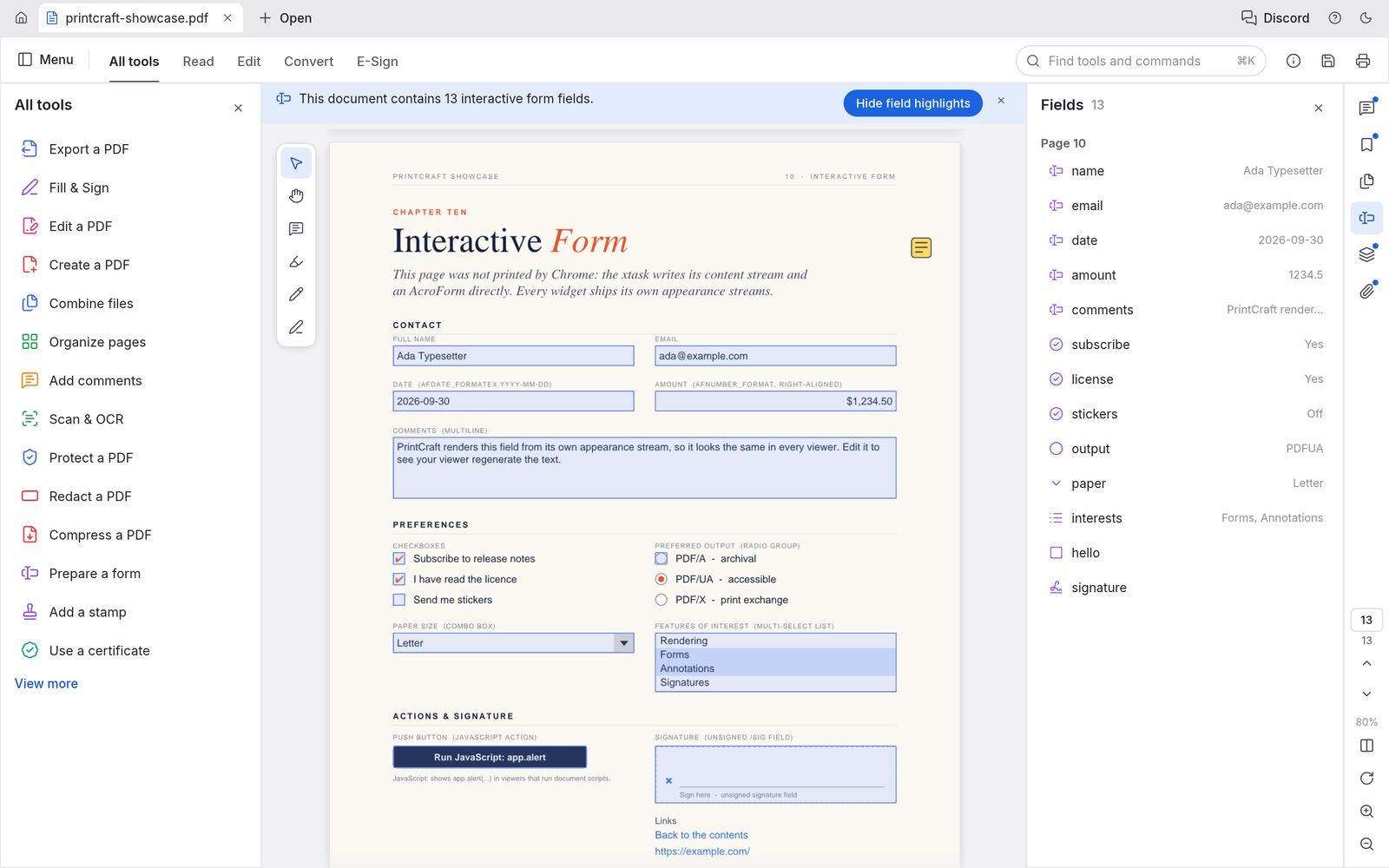
Fill supported fields
In Kimi K3 pdfcraft, inspect interactive form fields and enter the requested information. Open the saved PDF to confirm the values are retained.
Kimi K3 pdfcraft: Private saves and PDF copies
Use Kimi K3 pdfcraft to read and organize PDF documents with a focused, editable workflow. The browser workspace is available before sign-in. Account authentication is required when you want the site to retain a saved result or provide an exported download.
Keep the source available
In Kimi K3 pdfcraft, work from a copy when reviewing a PDF that matters. The upstream engine supports incremental edits, but every workflow still needs verification.
Sign in before saving
In Kimi K3 pdfcraft, the embedded editor sends saved bytes to the site. Authentication is checked before the private file is written to storage.
Find the finished result
In Kimi K3 pdfcraft, saved files are associated with your account and recorded in AI Tasks. Download the saved copy when you need to share it.
Kimi K3 pdfcraft: Practical PDF workflows
Use Kimi K3 pdfcraft to read and organize PDF documents with a focused, editable workflow. Complex imported files deserve extra attention. Compare layout, text, values, and supported objects with the source before treating an exported copy as the final version.
Prepare a reading pack
In Kimi K3 pdfcraft, collect the relevant pages from several documents. Organize them into a clear order and review the combined file.
Review a form
In Kimi K3 pdfcraft, read the instructions, fill supported fields, and add comments where clarification is needed. Confirm the saved result before sending it.
Keep expectations precise
In Kimi K3 pdfcraft, browser OCR and some Office conversions remain gaps upstream. Use the available PDF workflow without assuming every Acrobat feature is present.
用户评价
Kimi K3 视频创作者反馈。
Kimi K3 creator reviews

示例工作流:用原创图形、清晰文字和分镜节奏制作游戏标题动画,检查结果后再放入演示。

示例工作流:让简短解释按顺序展开为动画图解,比较 Sketch 与 Motion 两种风格。

示例工作流:将授权产品图片与简短卖点排在一起,检查实际屏幕尺寸下的构图。

示例工作流:用一句标题和少量颜色制作竖屏片头,导出后可在剪辑中另配声音。

示例工作流:对已保存动画提出一项明确修改,比较版本后导出。

示例工作流:制作静音图形片段解释演示结构。这些是用途示意,不是真实客户评价或效果承诺。
Local editing and document saves use no AI generation credits. Sign in to save or export.
Kimi K3 价格与积分套餐
随时取消
Lite
50%折扣0.025/积分
每年计费$179· 节省$179.8
视频模型



图像模型



- 包含 Kimi K3.1 及所有高级模型
- 最多1个批量生成任务
- 标准生成速度
- 标准生成成功率
- 标准客户支持
- 商业使用许可
Standard
50%折扣0.017/积分
每年计费$299· 节省$299.8
视频模型
图像模型
- 包含 Kimi K3.1 及所有高级模型
- 最多4个批量生成任务
- 优先处理速度
- 高生成成功率
- 优先客户支持
- 商业使用许可
Pro
50%折扣0.014/积分
每年计费$599· 节省$599.8
视频模型
图像模型
- 包含 Kimi K3.1 及所有高级模型
- 最多10个批量生成任务
- 最快生成速度
- 高生成成功率
- 专属客户经理
- 商业使用许可
Max
50%折扣0.012/积分
每年计费$1,199· 节省$1,199.8
视频模型
图像模型
- 包含 Kimi K3.1 及所有高级模型
- 最多10个批量生成任务
- 最快生成速度
- 高生成成功率
- 专属客户经理
- 商业使用许可
通过以下方式安全支付






















常见问题
Frequently asked questions
What is Kimi K3 pdfcraft?
Kimi K3 pdfcraft is the Kimi K3 pdfcraft browser workspace on Kimi K3 kimik3ai.com, built from the open-source storytold project. It helps you read and organize PDF documents. The site adds account-based saving and file records around the editor.
Do I need an account to try Kimi K3 pdfcraft?
You can open Kimi K3 pdfcraft and work with local files before signing in. Saving to the site or exporting a result requires authentication. A pending save is kept in this browser while you sign in.
Where does Kimi K3 pdfcraft save my files?
Kimi K3 pdfcraft saves results in the site’s private user storage. Each completed operation creates an AI Tasks record with the file name and output reference. Access to the saved file is checked against the owning account.
Ca Kimi K3 pdfcraft open every PDF file?
Kimi K3 pdfcraft uses an upstream editor that is still in alpha. Supported files can be opened and edited, but complex layouts and advanced features need a comparison with the source. Keep the original and inspect exports.
Does Kimi K3 pdfcraft charge credits for local editing?
Kimi K3 pdfcraft runs editing in your browser. These document saves are recorded as zero-credit operations. The site’s separate AI image and video tools keep their own displayed pricing and generation workflow.
行动入口
Start working with Kimi K3 pdfcraft
Bring a file to Kimi K3 pdfcraft, make a focused change, and inspect the result. Sign in when you are ready to save your private copy.
Open the workspace